

Local citation management is the ongoing work of keeping your business name, address and phone number (NAP) identical on every directory, map and app where customers might find you. Building listings is a one-time job. Managing them is a habit: you keep a single master record, check it against your main listings on a schedule, and update everything whenever a detail changes. Done well, it stops customers from landing on a wrong number, an old address or a duplicate profile, and it gives search engines one clear picture of your business.
This guide is written for Canadian owners and marketing managers who want listings that stay right over time instead of being fixed in a panic once a year.
TL;DR
- A citation is any mention of your business name, address and phone number online, with or without a link. Management means keeping all of them identical.
- Start with one master record, then audit your main listings against it, starting with Google Business Profile.
- Fix duplicates and outdated entries before you create new listings.
- Review the main listings on a regular rhythm and after every change of name, address, phone number or hours.
- In Canada, decide once how your bilingual details are written, then use that version everywhere.
Table of Contents
- What local citation management actually is
- Why consistency matters for a Canadian business
- Step 1: Write your master record
- Step 2: Audit what already exists
- Step 3: Fix in the right order
- Which listings should a Canadian business prioritise?
- Step 4: Build a maintenance rhythm
- Managing by hand, with software, or with a team
- How to tell whether it is working
- Our perspective
- Where we come in
- FAQ
- Sources
What local citation management actually is
A local citation is a mention of your business details on a page you do not own: a directory, a chamber of commerce page, a map app, a review site, a data aggregator, a local news listing. The core of it is NAP: name, address, phone number. Many citations also carry a website address, hours, categories and a short description.
Citation building is the act of creating those listings. Citation management is everything afterwards: knowing where you are listed, keeping each entry correct, removing duplicates and updating the lot when something changes. The Rank.ai glossary makes the same distinction: building is a one-time job, while consistency is ongoing because businesses move, change numbers and rename.
The reason this matters is practical. Businesses are not static. A phone number is swapped for a tracked line, a second location opens, a suite number changes, a legal name becomes a trade name. Each change leaves old versions scattered across sites you may have forgotten you ever joined.
Why consistency matters for a Canadian business
Three things go wrong when your details disagree between listings.
Customers get lost. Someone drives to an old address or calls a disconnected number. That is a lost job and a poor first impression, and you never see it happen.
Search engines lose confidence. Local results are built from many data points. When several sources agree on who you are, where you are and what you do, your business is easier to match and to trust. When they conflict, it is harder to know which version is right.
Your reviews and profile split. Duplicate listings divide reviews, photos and activity between two profiles, so neither looks as strong as the single one would.
Google’s own guidelines for representing your business say the name, address and details on your profile should reflect how the business presents itself in the real world. That is the standard to hold every other listing to: the same version everywhere, as customers see it on your sign, your invoice and your website.
If you are weighing how listings fit into wider visibility, our guide on why local SEO isn’t working for many Canadian businesses shows where inconsistent details sit among the other common causes.
Step 1: Write your master record
Everything else depends on one document that settles every question about how your details are written. Put it in a shared file the whole team can find.
Include:
- Business name exactly as on your storefront and website. No added keywords, no city name stuck on the end.
- Address in one fixed format: street number and name, suite or unit, city, province abbreviation, postal code. Choose “Suite 200” or “#200” and never mix them.
- Primary phone number with area code, in one format, such as (514) 555-0123. Decide which number is the main one.
- Website address, the exact URL you want customers to land on, including https and whether it uses www.
- Hours, including holiday hours.
- Categories and a short description, one 50-word and one 150-word version.
- Logo and photos in the sizes directories ask for.
Write down what you have used in the past too: former names, old addresses, retired phone numbers. That list is your search key for finding stale entries in the next step.
The bilingual question
Canadian businesses, and Quebec businesses in particular, often have a French and an English version of a name or description. Pick a policy and record it: which name is the legal and listed name, which accents are used, whether the description is supplied in both languages. The goal is not to hide a bilingual identity but to make it deliberate. A name that appears with accents on one site and without on another is a common source of accidental duplicates.
Step 2: Audit what already exists
Most businesses have more listings than they think. Some were created by the owner years ago, some by a former agency, some automatically by data providers or by the previous tenant at your address.
- Search by each version of your details. Search your current and former business names, old and new phone numbers and every past address in quotation marks. Check the first few pages, not just the first.
- Check the major platforms directly. Search for your business on Google Maps, Apple Maps, Bing Places, Facebook, Yelp and the main Canadian business directories. Look for second profiles and for “permanently closed” flags that should not be there.
- Check the long tail. Chamber of commerce and board of trade pages, industry associations, local news directories, supplier and partner pages and any marketplace you sell through.
- Record each find in a spreadsheet. Columns: site, URL, name as shown, address as shown, phone as shown, website, status (correct, wrong, duplicate, unclaimed), who owns the login and date checked.
- Mark every mismatch against the master record, however small. Differences in abbreviation, a missing suite number, an old tracking number: each counts.
The spreadsheet is the most valuable thing you will produce. It turns an invisible problem into a list.
Step 3: Fix in the right order
Order matters, because some listings feed others.
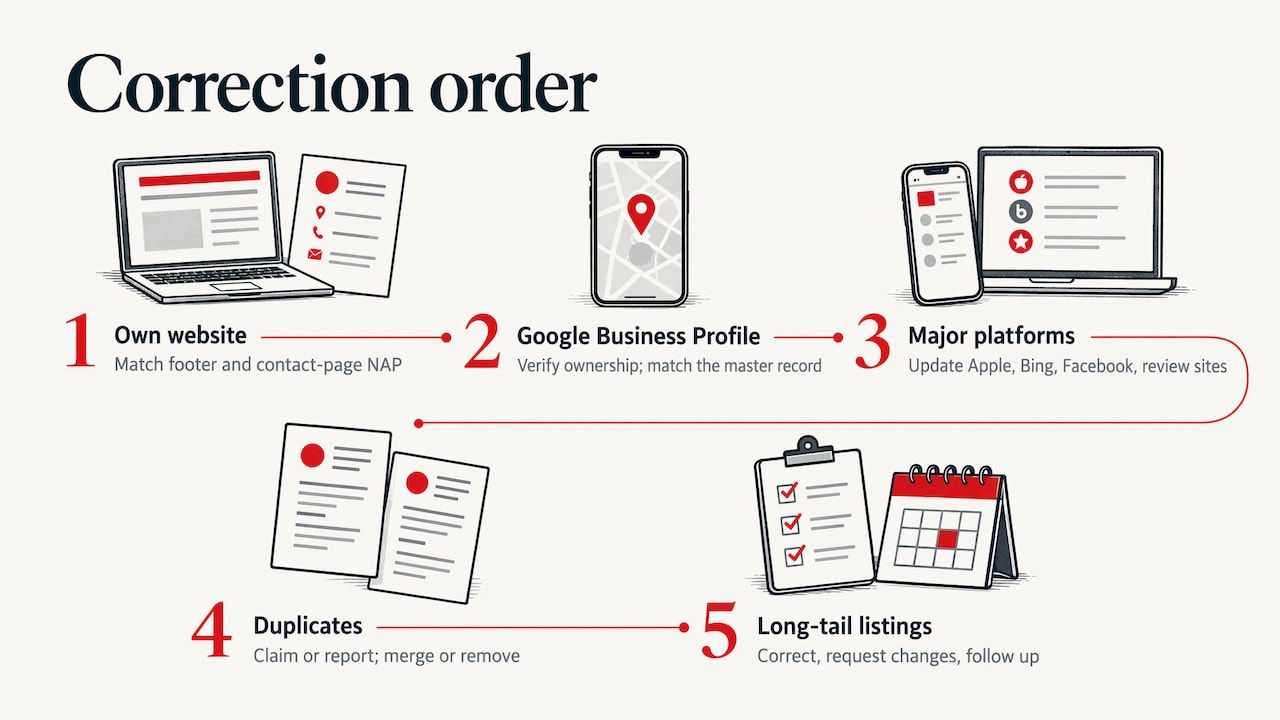
First, your own website. Make sure the NAP in your footer and on the contact page matches the master record exactly, as text and not only in an image. If the source is wrong, every correction elsewhere will drift again.
Second, Google Business Profile. It is the listing customers see first on maps and in local results. Check the name, address, phone, hours, categories and website against the master record, and confirm that you are the verified owner with access to the account.
Third, the major platforms: Apple Maps, Bing Places, Facebook and the main review sites.
Fourth, duplicates. Where a duplicate exists, the safest path is usually to claim or report it through the platform’s own tools so that it is merged or removed, rather than leaving it live. Do not simply create a new listing over a messy one.
Fifth, the long tail. Correct what you can, request changes where you cannot, and note any site that does not respond so you can follow up.
Two cautions. Never delete a listing that holds reviews until you understand what the platform does with them. And do not keep an old phone number listed on some sites “just in case”: a line you have retired should be removed or updated everywhere.
Which listings should a Canadian business prioritise?
There are thousands of directories, and most add little. Prioritise by who actually sends you customers and who supplies data to others.
| Priority | Type of listing | Why it matters |
|---|---|---|
| 1 | Google Business Profile | Where most local searches by map or phone start |
| 2 | Apple Maps, Bing Places | Cover iPhone, Siri, Microsoft and some voice assistants |
| 3 | Facebook and one or two review platforms | Customers check them before they call |
| 4 | Canadian business directories | Reinforce your Canadian address and phone details |
| 5 | Industry and association directories | Relevant to your trade, often with strong local relevance |
| 6 | Chamber of commerce, local organisations | Community signals tied to your city or region |
| 7 | Data aggregators and in-car or GPS systems | Feed many smaller sites and apps |
A tradesperson serving three cities needs different priorities than a restaurant in Montreal. If you serve customers at their homes, our page on local SEO for home service businesses in Canada covers how service areas change the picture. For restaurants, see local SEO for restaurants in Quebec.
Step 4: Build a maintenance rhythm
The real value of management is that it is repeatable. A schedule beats good intentions.
- Triggered updates. Any change to your name, address, phone, website, hours or categories means updating the master record first, then every priority listing the same week.
- A regular review. A quarterly or twice-yearly check of your top platforms against the master record catches drift. The FreeDir NAP consistency guide recommends this kind of lightweight rhythm even when nothing obvious has changed.
- Seasonal review. Update holiday hours before the holidays, not after.
- An owner. Name one person responsible, with a backup. Listings fail when everyone assumes someone else has them.
- Shared logins. Keep logins in a password manager owned by the business, never in one employee’s personal email.
This last point is the one that hurts most in practice. When an agency or a former employee created your listings under their own accounts, you may not be able to change them. Make sure every login belongs to your business.
Managing by hand, with software, or with a team
There are three ways to run this, and the right one depends on how many locations you have and how much time the work takes.
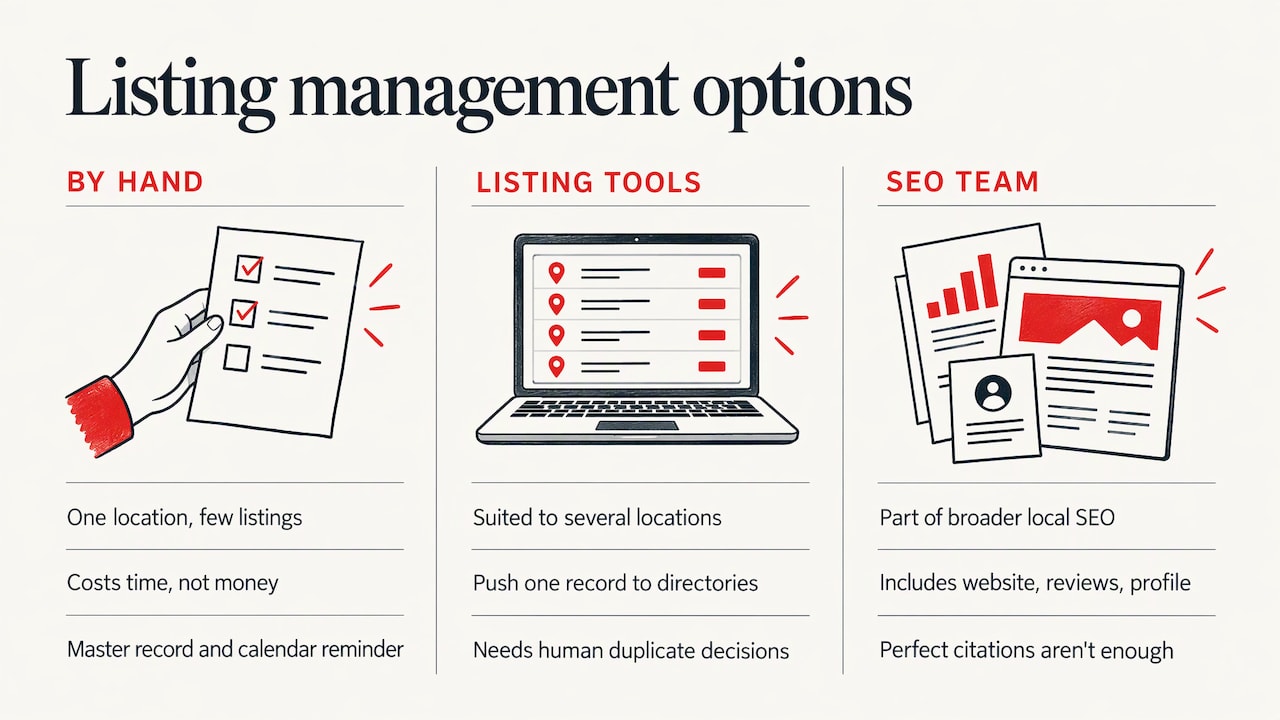
By hand works for a single location with a handful of main listings. It costs time, not money, and the master record plus a calendar reminder is enough.
Listing tools push one record to many directories at once and flag changes. They suit businesses with several locations, but they still need a person to supply the right record, decide on duplicates and handle platforms the tool does not reach. A subscription that lapses can also leave you unsure which listings are still under your control.
A local SEO team treats listings as one part of a larger local visibility system alongside your website, reviews and Google profile. That matters because a perfect citation does little if your website’s contact page contradicts it or your reviews are unanswered. If you are weighing this route, why hire a local SEO company explains what that work typically covers.
Whichever way you go, check three things: who owns the accounts, whether the record is yours to export, and who is accountable when something goes wrong.
How to tell whether it is working
Citation consistency is a foundation, not a trick, so measure it by outcomes you can observe.
- Your audit sheet. The share of priority listings that match the master record. The goal is every one of them.
- Duplicate count. It should fall to zero and stay there.
- Google Business Profile insights. Watch calls, direction requests and website clicks over several months, not days.
- Call tracking and booking sources. Ask new customers how they found you, and record it.
- Wrong-number or wrong-address contacts. Customers arriving at the wrong place, or calling about a retired service, should disappear.
Expect gradual change. Corrections are picked up by different platforms at different speeds, and listings are only one of the signals that shape local visibility. Reviews matter alongside them; how reviews affect local SEO and Google Business Profile rankings explains how the two work together.
Our perspective
Most of the listing problems we are asked about are not technical. They come from a business growing faster than its records: a new number here, a moved office there, a French name on one site and an English name on another, and no one owning the whole picture.
We believe local visibility should be something a business owns, not something it rents. Your listings, your website, your domain, your hosting and your data should all belong to you, and they should all say the same thing. That is why we treat citations as one part of a connected local growth system rather than a stand-alone task.
Our team does the work in-house and you speak directly to the people doing it, not to an account manager. We work in English and French, so a Canadian business with bilingual customers gets a deliberate approach to how its name and details appear, not an accident of whichever directory came first.
The strongest listing setup is the boring one: one master record, one owner, one schedule.
DM
Where we come in
If you would rather have your listings, website, reviews and local search handled as one system, our SEO and local search and reputation and reviews services are built for that. You work directly with the team doing the work, and you keep ownership of your domain, hosting and data. You can also start with the free Leak-Proof Audit™, which evaluates your local authority and points to where visibility and revenue are leaking.
See our SEO and local search services or the wider services overview.
FAQ
What is the difference between citation building and citation management?
Building creates your listings. Management keeps them correct afterwards: auditing them, removing duplicates and updating every one when your details change. Building happens once per listing, while management is a recurring routine that protects the work you already did.
How often should I check my local listings?
Check your main listings on a regular schedule, such as quarterly or twice a year, and again whenever your name, address, phone number, website or hours change. Holiday hours should be updated before the holiday. A calendar reminder tied to one named person is the simplest way to make it happen.
Do small formatting differences really matter?
They can. “Suite 200” versus “#200” is minor to a human, but it can create confusion for systems that match records, and it is one of the easiest ways for duplicates to appear. The simple answer is to pick one format in your master record and use it everywhere, including on your own website.
What should a bilingual Canadian business do about its name?
Decide which version is the official listed name and how accents are written, then use it consistently. Where a second-language description is useful, add it as a description rather than changing the name. Record the decision in the master record so every listing follows it.
Can I handle citation management myself?
Yes, for one location the work is a master record, an audit sheet and a schedule. Many owners find it slips when business gets busy. A team that already manages your website, reviews and local search can keep it on schedule alongside everything else.
Sources
- Citation building, Rank.ai glossary
- NAP Consistency Guide for Directory Cleanup, FreeDir
- Guidelines for representing your business on Google, Google Business Profile Help